Future Face - See Your Future
- 4.4
- Rating
- 1.00M
- Installs
- Free
- Price

 Analysis by App-foxy
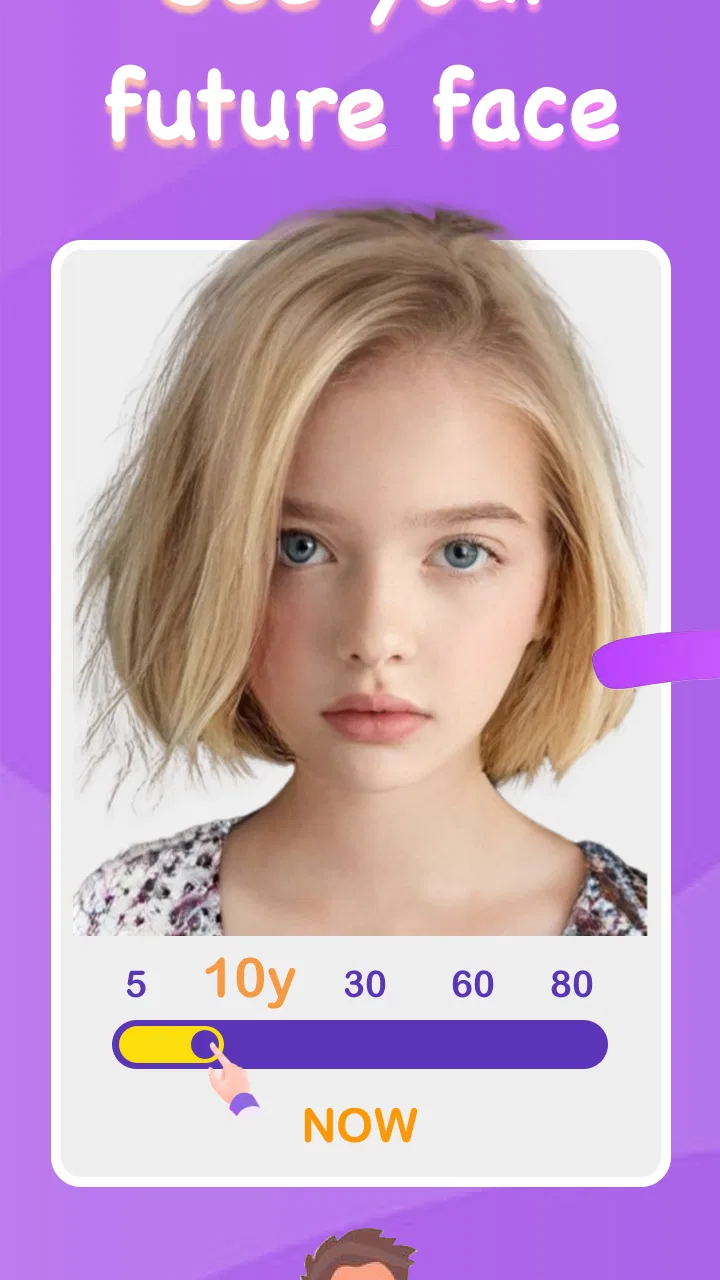
I tried Future Face - See Your Future as a lighthearted photography app rather than as a serious prediction tool, and that distinction matters from the first tap. Its central idea is simple: use a face photo to create an imagined version of how you might look later in life. The result is designed for curiosity, conversation, and sharing, not for medical, scientific, or personal planning decisions. If you approach it with that expectation, the experience is easy to understand and enjoyable in short sessions.
The app comes from FutureDream Lab and is available for free to Android users. It sits in the photography category, although its appeal is closer to a playful face-editing experiment than to a conventional camera or editing suite. The age rating is Everyone, which fits the uncomplicated concept. I would describe it as an app for a spare minute with friends, a family photo experiment, or a quick social post—not as a replacement for a full editor such as a portrait retouching tool.
How the basic photo workflow feels in everyday use
The most sensible way to use Future Face is to begin with one clear, front-facing photo. A well-lit image makes the idea easier to judge because the face is visible and the transformation has a cleaner starting point. I found that casual snapshots can still be entertaining, but busy backgrounds, heavy shadows, sunglasses, and extreme angles make the outcome harder to interpret. The app is more enjoyable when I treat the first image as a baseline rather than expecting every picture to produce an equally convincing result.
You May Also Like

 Blood Strike: 2.5 Anniversary
Blood Strike’s Loadouts Turn Every Drop Into a Tactical Gamble
A close look at Blood Strike’s custom loadouts: how fast access to signature weapons reshapes its battle royale rhythm, rewards preparation, and narrows the gap between fights.

 Pandora - Music & Podcasts
Pandora’s Music Is Easy to Start, but Harder to Recover
Pandora’s strength is its low-effort path from a seed to a station. Its weak spot is how much confidence it asks you to place in connection, setup, and quiet recovery.

 8 Ball Pool
 Is Built on Rivalries, Rematches, and Routine
A close look at the rivalries, rematches, shared routines, and unanswered safety questions that turn a quick pool match into a persistent mobile community.

 Samsung Music
’s Quiet Strength Is Playing What You Already Own
Its reach comes less from spectacle than from dependable access to a personal library. That simplicity is both the app’s strongest retention engine and its ceiling.

 AccuWeather: Weather Radar
AccuWeather Review: A Quick, Clear Forecast for Everyday Decisions
For everyday plans, the best forecast is the one you can understand quickly. AccuWeather makes rain timing, radar, and local conditions easy to act on, with a few trade-offs.

 Hill Climb Racing
Why Hill Climb Racing Still Turns Crashes Into One More Run
A tiny car, a bumpy hill and one more upgrade: Hill Climb Racing keeps resurfacing because its simple chaos makes every near-miss feel personal.
More From Our News Desk
View All News


For a quick test, I would choose a recent portrait with a relaxed expression and keep the original image available for comparison. That small habit makes the result more useful: instead of staring at the edited face in isolation, I can notice which parts of the appearance changed and which stayed recognizable. It also prevents the common mistake of judging the app only by a single poor input photo.
The workflow is intentionally approachable. You do not need photography knowledge, and the concept is clear enough for someone who rarely uses editing apps. That simplicity is one of its strengths, especially when several people want to try it in sequence. A friend can select a photo, view the imagined future appearance, and pass the phone along without learning a complicated interface.
A realistic everyday scenario is a family gathering where everyone has a different idea of how they might look in the future. The app works well as a conversation starter because the result is visual and immediate. I would still ask permission before using another person’s photo, particularly with children or anyone who may feel uncomfortable seeing an age-transformed image. The Everyone rating makes the app broadly accessible, but respectful use still depends on the person holding the phone.
For personal use, I recommend saving the original portrait separately before experimenting. That is not because the app is difficult, but because a repeatable comparison is more entertaining than a one-off reaction. I also prefer testing the same person with two or three different expressions or lighting conditions, then treating the results as variations of a playful filter. This gives a better sense of how strongly the starting photo influences the outcome.
The app’s popularity suggests that this straightforward idea has broad appeal. It has passed one million installs and holds an average rating of 4.3, which places it comfortably among the casual photography apps people try for amusement. Those figures do not make every result reliable, but they do indicate that the basic premise is easy for many users to understand.
Settings and choices that deserve attention
Future Face is not the kind of application where I would spend a long time tuning dozens of controls. Its value comes from getting to the result quickly. Even so, experienced users can improve the experience by being deliberate about the image they select and by checking the available choices before repeatedly processing similar photos. The important setting, in practice, is often the input itself: composition and lighting have more influence on the usefulness of the result than elaborate editing technique.
I suggest beginning with a neutral portrait, then trying a second image with a slightly different expression. If both outputs preserve recognizable features, I take that as a more satisfying experiment than relying on a dramatic selfie with a tilted camera. This is a simple but non-obvious trade-off: a more polished photo may produce a clearer visual comparison, while a spontaneous photo may be funnier but less consistent.
It is also worth checking the app’s current version before drawing conclusions from older screenshots or advice. The version I reviewed is 2.2.7, and the minimum operating system is Android 7.0. That makes it accessible to many older Android devices, though the experience can still vary depending on the phone’s camera quality, screen, and general performance. If the app feels slow or the image looks poor, I would first test a smaller, clearer portrait and close other demanding apps before assuming the concept itself is at fault.
Future Face is free to install, but it includes optional purchases priced from $14.99 to $159.99 per item. That is the detail I would pay closest attention to before tapping any purchase control. A free download is useful for deciding whether the core effect suits you, but the presence of costly optional items means I would not treat every visible enhancement as part of the no-cost experience. For a casual try, I would stay with the free path until I understood exactly what an optional item adds.
Another useful habit is to decide in advance whether you are testing the app for personal amusement or preparing an image to share. Those goals are different. For a private experiment, an imperfect result can be funny. For a post or message, I would choose a cleaner photo, check the preview carefully, and avoid presenting the result as a genuine forecast. The app’s concept invites imagination, so clear wording around a shared image helps prevent friends from reading more certainty into it than intended.
I would also avoid using very old photographs as the only test. Comparing a current portrait with an older one can be entertaining, but differences in camera quality, hairstyle, facial expression, and image resolution may confuse the comparison. If you want a fairer personal experiment, use photos taken under similar conditions. That approach turns the app into a more controlled visual exercise without pretending it has scientific accuracy.
Faster habits for repeat use
The quickest repeatable pattern is simple: prepare a small selection of suitable portraits first, test the clearest one, and keep the original beside the result. This avoids wasting time searching through a gallery after every attempt. I would create that selection mentally rather than assuming the app needs a dedicated album; three or four well-lit images are usually enough for a casual comparison.
When using the app with friends, I would establish a turn-taking routine. Each person chooses their own photo, checks the result, and decides whether they want to show it. That keeps the activity playful and avoids the awkwardness of editing someone else’s face without asking. It also makes the session faster because nobody is debating every image in the gallery.
A second efficient pattern is to test one variable at a time. For example, I might use the same person with a neutral expression and then with a smile, rather than changing the person, lighting, angle, and expression all at once. This does not make the output scientifically valid, but it makes the visual differences easier to understand. It is particularly helpful when the result seems surprising and I want to know whether the source photo caused the change.
I would not repeatedly process nearly identical images just to find a “perfect” future face. That habit can turn a quick novelty into a frustrating loop, especially when the differences are subtle or unpredictable. The better approach is to accept the app as a creative filter: choose a good source, view the result, compare it with the original, and move on if the effect does not suit the image.
The app is also a better fit for short bursts than for long editing sessions. Unlike a standard photography editor, it is not where I would go to correct exposure, remove distractions, build a collage, or make precise portrait adjustments. If my goal is a polished profile picture, I would start with a conventional editor and use Future Face only when I want the specific future-appearance concept.
For sharing, I recommend adding context in the caption or message. Saying that it is a playful imagined look keeps the tone clear. This matters because an altered face can be emotionally sensitive, especially when the person viewing it is worried about aging or appearance. The app is most successful when everyone involved understands that the result is entertainment rather than a promise about the future.
Where the concept reaches its limits
The main limitation is the gap between the app’s imaginative premise and what a photograph can actually predict. A face changes over time for many reasons, including genetics, lifestyle, health, expression, and ordinary variation. A visual effect cannot account for all of that, so I would never use the output to make decisions about health, skincare, relationships, or appearance. It is a stylized possibility, not a personal forecast.
Results can also feel inconsistent when the source images differ substantially. A face photographed from below may appear unlike the same face photographed straight on, and a strong expression can influence the whole impression. This is why I consider the input-photo workflow part of the app’s quality. Someone who uploads the first image they find may blame the effect for an outcome that was largely shaped by the original angle or lighting.
Another limitation is that the app has a narrower purpose than a full photography package. If you want manual control, layered edits, precise retouching, filters, cropping, and export choices in one place, a more established photo editor will be the better option. Future Face wins when the specific future-face experiment is the point; it loses when you need a complete toolkit.
Privacy-minded users should think carefully before selecting personal portraits for any photo-processing app. I would read the app’s current permissions and privacy information on the store page and use an image I am comfortable processing. I would be especially cautious with other people’s photos and with images containing private surroundings, documents, or identifiable details in the background. This is a practical consideration, not a reason to reject the app outright.
The optional purchase range is another reason to keep expectations realistic. Since the download is free but individual purchases can be expensive, I would not assume that paying more automatically produces a more meaningful or accurate result. The right question is whether a particular option adds enough creative value for your own use. If you only want to try the idea once, spending money is unlikely to be necessary.
People who dislike appearance-based filters should probably skip this app. The entire experience is built around seeing a changed version of a face, and that can be uncomfortable rather than amusing. It is also not ideal for anyone seeking evidence-based information about aging. In those cases, a normal camera app or an educational source would be a better choice.
My verdict after using it as a photography experiment
I see Future Face as a focused novelty app that does one recognizable thing and is easiest to enjoy when used briefly. Its strongest qualities are accessibility, a clear idea, and the way it creates an immediate topic for conversation. The developer, FutureDream Lab, has kept the concept approachable enough for casual users, and the broad Everyone rating supports that role.
My recommendation is conditional but positive: try it if you enjoy playful portrait effects and understand that the output is an imagined transformation. Start with a clear front-facing photo, compare more than one suitable image, and avoid treating the result as a prediction. Those habits make the experience more consistent and reduce the disappointment that comes from expecting a realistic view of your actual future appearance.
I would choose a conventional photo editor instead when I need control, accuracy in retouching, or a polished final image. I would also skip Future Face if the idea of changing someone’s apparent age feels intrusive or upsetting. For everyone else, the free download offers a low-commitment way to test the concept, while the optional purchases deserve careful consideration before spending.
Overall, Future Face - See Your Future works best as a quick social photography toy, not as a serious forecasting tool. Its value comes from the reaction it creates and from the small creative ritual of choosing, comparing, and sharing portraits. Used with that honest framing, it can be a fun addition to a phone’s photography folder; used as a literal answer about how someone will age, it asks far more of an app than a single photo can provide.
FAQs for Future Face - See Your Future
01What is Future Face - See Your Future and how does it work?
Future Face - See Your Future is an entertainment app that uses advanced facial recognition and AI technology to predict how your appearance might change over time. By analyzing your current facial features, the app generates images that show potential future changes, offering a fun glimpse into how you might look as you age.
02Is the Future Face app safe to use in terms of privacy?
Yes, Future Face - See Your Future is designed with user privacy in mind. The app only processes images locally on your device to ensure that your photos are not stored or shared without your consent. Always check the app's privacy policy for the most up-to-date information on data handling practices.
03Does the app require an internet connection to function?
While some features of Future Face - See Your Future may require an internet connection, such as updates or sharing results, the core functionality of generating future images typically operates offline. This means you can enjoy the app even without a constant internet connection after the initial download.
04Are there any in-app purchases or additional costs?
Future Face - See Your Future is free to download, but it may offer in-app purchases for additional features or ad-free experiences. These can include advanced prediction models or the ability to save and share more images. Check the app's listing on the store for details on pricing and available packages.
05What devices and operating systems are compatible with Future Face?
Future Face - See Your Future is available for both Android and iOS devices. It is compatible with most smartphones and tablets running recent versions of these operating systems. However, to ensure optimal performance, it is recommended to use a device with a high-quality camera and sufficient processing power.
Pros
- User-friendly interface for easy navigation.
- Variety of filters for fun aging effects.
- Quick processing time for transformations.
- High-quality image outputs.
- Option to share results directly on social media.
Cons
- Contains ads that can be distracting.
- Limited features in the free version.
- Requires internet connection for full functionality.
- Occasional glitches in face detection.
- In-app purchases can be costly.

Future Face - See Your Future
Gallery